How it works
The parts, the full feature list, the markers, the HTTP API, and the install steps that are optional.
The three pieces
Three pieces, all on your machine:
Google Meet tab
   │  (transcript, snapshots, mic control)
   ▼
Chrome extension  ──HTTP──►  Local bridge server (127.0.0.1:8848)
   ▲  (advice, chat, TTS)          │
   └───────────────────────────────┤  transcript file + advice/chat channels
                                    ▼
                          The "brain" - a Claude Code session with YOUR
                          context (notes, docs, tools) reads the call over MCP
                          and replies with advice / chat / TTS.
The extension only captures and displays. The intelligence is the brain - a local agent session that already knows your work.
What it does
Live transcript
Captures the Meet call transcript in real time into a side panel - from captions or local speech-to-text.
Local STT
Optional caption-free transcription of the call audio via whisper.cpp - fully offline, no cloud, no subscription.
Colour-coded advice
Your assistant pushes what to say, facts, summaries, risks and actions - links & images included.
Smart snapshots
Auto-captures the tab while someone shares their screen; on-demand otherwise - visual context for the assistant.
In-panel chat
A two-way back-channel to ask the assistant things mid-call without speaking.
Speak into the call
Text-to-speech in the call's language that can be routed straight into the meeting.
Live demo edits
Ask the assistant to fix a typo or hide a broken element on your shared screen - presentation-only, revertable, never saved.
Meeting modes
Listener, Lead, or Auto - tune how proactively the assistant suggests based on your role in the call.
Decisions & action items
A live board of decisions and owner-tagged action items, and one click asks the assistant to draft the ticket or note.
Recap & alerts
Ask "what did I miss?" anytime; get nudged when you're named, look muted, or a risk appears.
Meeting-type aware
Detects standup / 1:1 / incident / review and adapts what it surfaces; remembers recurring series.
Meet & Zoom
Works on Google Meet and the Zoom web client - same live transcript, advice and tools.
Co-pilot mode
No meeting needed: start a session, and the assistant watches your tab and listens to your mic while you debug or build.
Action-item autopilot
In grooming / mob sessions it captures action items and - once you opt in - creates the tickets and drops the links in the meeting chat.
Your files, your account
What you send the assistant goes to your own Claude account. Everything else stays on your disk.
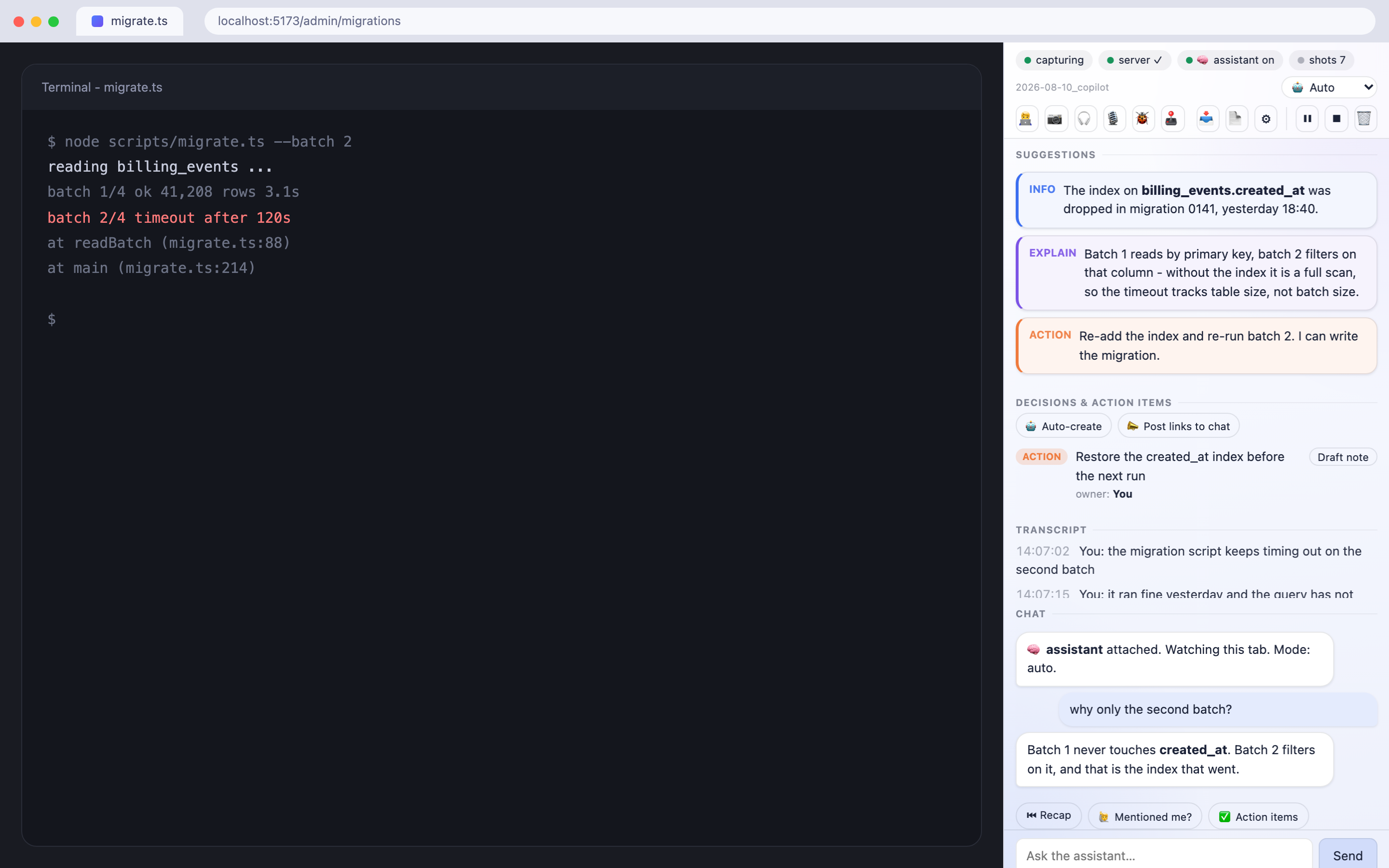
Advice markers
| Marker | Meaning |
|---|---|
| 🟢 SAY | Exact words you can say right now (in the call's language). Press 🔊 to voice it. |
| 🔵 INFO | A fact, number, link or name from your context. |
| 🟡 SUMMARY | Where the discussion is / what was just decided. |
| 🟣 EXPLAIN | A short explanation of a term or the why behind something. |
| 🔴 RISK | A risk, a decision to recall, or a contradiction to flag. |
| 🟠 ACTION | Something you could do / were asked to do - the assistant can perform it on your confirmation. |
Optional install steps
The three steps on the overview get you a working panel. These three are worth doing once you know you are keeping it.
-
(Optional) Autostart the server
On macOS,
./server/install-server.shinstalls a launchd job so step 2 stops being a step. It works out your node binary and paths itself. -
(Optional) Enable "speak into the call"
TTS needs a virtual audio device so synthesized speech reaches Meet as your microphone:
brew install blackhole-2chThen in Audio MIDI Setup create an Aggregate Device combining your real microphone + BlackHole 2ch (drift-correct BlackHole), and set it as your macOS default input. Tick 🎙 into call in the panel and press 🔊 on a suggestion.
-
(Optional) Local speech-to-text
To transcribe the call's audio instead of scraping captions, install whisper.cpp and a model, then start it with ⌘⇧U while the Meet tab is focused (a keyboard command is required so Chrome grants tab-capture access; the panel's 🎧 checkbox reflects the state):
brew install whisper-cpp
mkdir -p ~/.local/share/whisper
curl -L -o ~/.local/share/whisper/ggml-base.bin \
  https://huggingface.co/ggerganov/whisper.cpp/resolve/main/ggml-base.bin
Server API
| Endpoint | Purpose |
|---|---|
POST /append | Transcript sink (from the extension). |
POST /advice · GET /advice | Brain pushes advice; panel polls it. Supports rich text + image. |
POST /chat · GET /chat | Two-way chat (role: user|agent). |
POST /snapshot · POST /snapshot-request | Store a tab snapshot; brain requests one. |
POST /speak · GET /voices | TTS (per-language voice, optional device routing). |
POST /stt | Transcribe an audio chunk locally with whisper.cpp. |
POST /items · GET /items | Decisions & action-items board. |
POST /mode · GET /mode | Meeting mode (listener / lead / auto). |
POST /summary · GET /summary | Post-call summary artifact (copy / download). |
POST /brain-ping | Liveness heartbeat - the panel shows if a brain is attached. |
POST /clear | Wipe one meeting (transcript, chat, summary, snapshots). |
GET /health | Status + tool checks (ffmpeg / whisper / BlackHole). The only route that needs no token. |
Every route except /health requires an X-MLA-Token header (the token from .mla-token).